Follow the change.
Review with context.
A pull request, organized into chapters. Read the diff, ask about the details, and prepare your feedback in one place inside BB.
Open source on GitHubYour first review, start to finish.
Now available directly in BB Community. The video shows the older, optional marketplace setup; use the current install steps.
Read the walkthrough transcript
0:00 · The first review
Understand the change before you make the call. Guided Review turns a pull request into chapters inside BB, with the code and your feedback together. Here's your first review.
0:09 · Install in BB
Start on the machine running BB. Add the Notpritam marketplace with the first command shown here. Then open Extensions, search for Guided Review, and choose Install. You can also use the second command. The extension is public and open source. You'll need BB version zero point forty one or newer, and Node twenty four or newer.
0:28 · Connect your tools
Open Guided Review, then Settings. Check that a BB agent provider is connected, a project is available, and GitHub CLI is installed. Sign in to GitHub on your BB server using the command on screen. Choose an account with access to your repository. There is no separate Guided Review token. Guide generation uses your connected agent's normal usage allowance.
0:50 · Generate & get notified
Paste a GitHub pull request link and start the review. Guided Review builds a reading guide around the diff. You can move on while it works. With Needs You installed, a completion alert opens the finished guide directly. Needs You is optional, and its notification preferences apply. The pull request in this walkthrough is sample data.
1:08 · Read in chapters
Start with the intent at the top, then follow the chapters on the left. Each chapter explains a related part of the change and keeps its files together. Read the diff, mark files as viewed, and use Focus or Full screen when you want more room. Treat the generated guide as a reading aid, and check its claims against the code.
1:26 · Notes & assistant
Keep your own checklist in Reviewer notes. These notes stay in BB and are not sent to GitHub or the review assistant. For a question about the change, open Ask assistant. The assistant can use the focused file or selected code as context. Its conversation stays with the review, so you can return to it later.
1:44 · Submit your feedback
Add comments to your draft and write a review summary. Choose Comment, Approve, or Request changes. Nothing in the draft is posted until you choose Submit to GitHub. Before sending, Guided Review checks the pull request revision and your GitHub identity. If the pull request changes, re-review the new revision. Your submitted reviews remain available in Reviewed and Archive.
2:04 · Settings & updates
In Settings, customize the guide and assistant instructions. Check for compatible updates here, or opt into automatic updates when idle. Automatic updates are off by default and wait until review work and open review pages are finished. Use your own BB installation for your own GitHub identity. Get the install steps and source at notpritam dot in, slash plugins, slash guided review.
Related changes in chapters
Private notes & contextual questions
Your draft, your verdict
Optional completion alerts
The code and the reasoning, together.
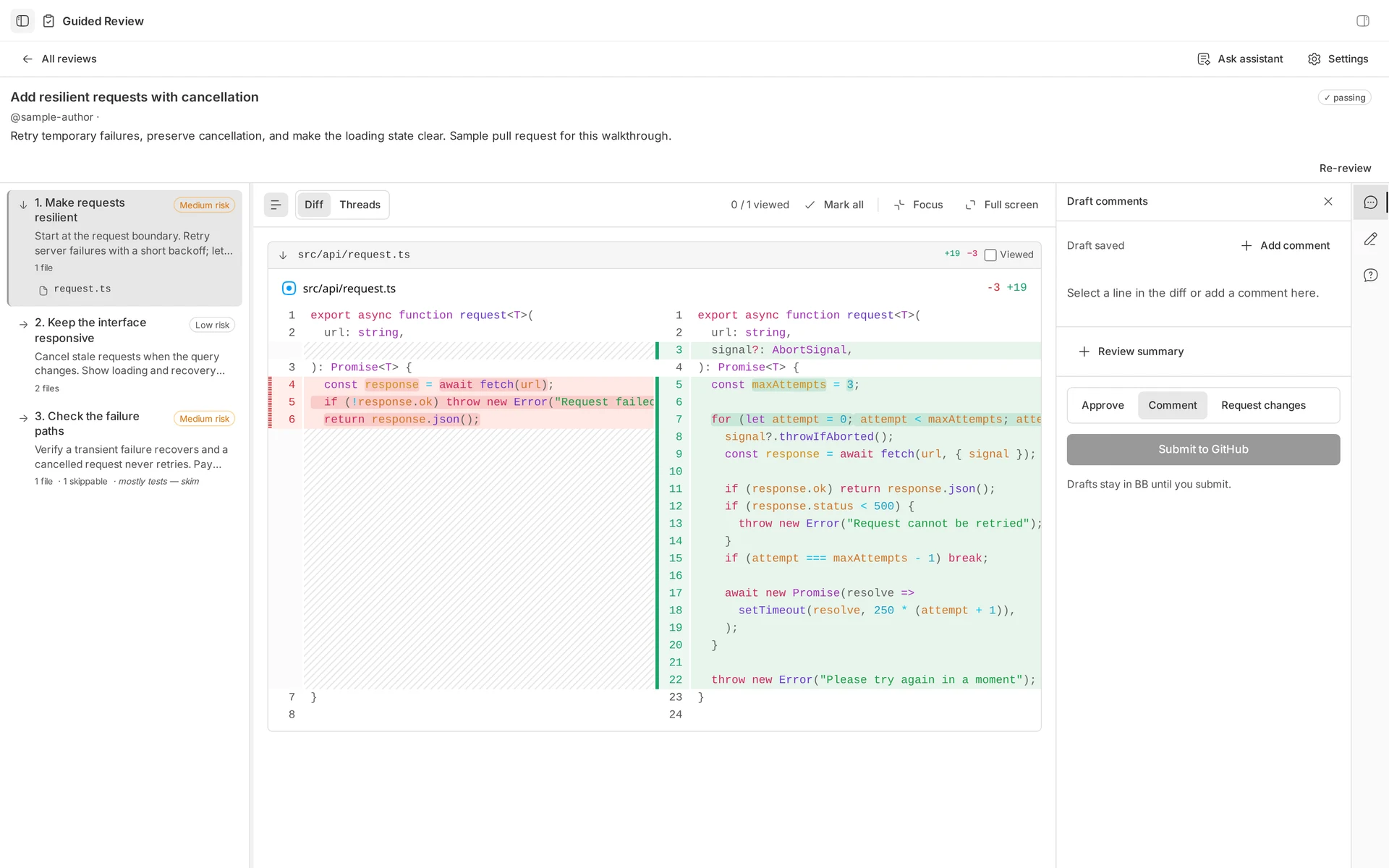 Open full-size
 A reading order for the change.
Follow related changes in chapters. Read the intent, inspect the diff, and mark files as viewed.
Sample PR · Add resilient requests with cancellationBring it into your BB.
Open Extensions in BB, search Guided Review, and install the listing by Pritam Sharma in BB Community.
Or run this on the machine running BB:
bb plugin install guided-review@bb-communityNo extra marketplace needed. If the listing is missing, refresh BB Community with bb marketplace refresh bb-community.
Add my marketplace too Optional
Keep my collection in your BB catalog as I publish more extensions. Plugins already listed in BB Community don’t need it, so adding this marketplace is optional.
bb marketplace add git:github.com/notpritam/bb-marketplace@mainAdding a marketplace installs nothing. Choose which plugins to install and refresh the catalog to discover new listings.
View my marketplace on GitHubYour first review
- Check Settings. Use BB 0.41+, Node 24+, Git and GitHub CLI on the BB server. Connect an agent provider and add a BB project.
- Sign in to your GitHub account. Use an account with access to the repository.
gh auth login --hostname github.com- Paste a PR link. Generate the guide, read its chapters, and submit your feedback when ready.
No separate plugin token. Guides and answers use your connected agent’s normal usage allowance.
Fits the way you review.
Set it up once. Return to the code, notes, and conversations whenever you need them.
Can it notify me when a guide is ready?
Yes. Install Needs You 0.2.0 or newer. It can alert you when generation completes or fails, and open the review directly. It keeps one item per review and follows your notification preferences and quiet hours. Telegram is optional.
How do updates work?
Open Guided Review → Settings → Plugin updates. Check and install compatible releases manually, or enable automatic updates when idle. Automatic updates are off by default, check hourly after five idle minutes, and wait for review work and all review or Settings pages to close. Saved reviews, drafts, notes, and preferences stay in place.
What is shared with GitHub and the agent?
Generating a guide or asking a question sends the relevant review context to your configured BB agent provider. Private reviewer notes stay in BB and are excluded from the assistant. Draft feedback stays in BB until you choose Submit to GitHub.
Use your own trusted BB installation for your own GitHub identity. A shared BB server shares its selected account, settings, and stored reviews.
What happens when the pull request changes?
Re-review the new revision before submitting. Guided Review checks the reviewed revision and GitHub identity before sending feedback. Submitted reviews remain in Reviewed; closed and merged reviews move to Archive, with their guides, notes, and conversations available.
A quick look for your team.
Share this page for the full setup guide, or download the short launch film for your group.
Download launch filmA product demonstration with sample review data.